The Rwanda High Commission in Canada is now issuing consular cards to Rwandans living in Canada. Here is the step-by-step process.
The Rwanda High Commission in Canada is now issuing consular cards. Follow these steps:
1. Create your account on the Rwandan Community Abroad portal (personal information, document type and number, place of birth).
2. Check your email inbox (and spam folder) and click the activation link.
3. Return to the login page to access your account.
4. Your account awaits embassy approval — the review typically takes 1–3 business days, and you will receive an email once approved.
5. Once approved, log in and request your Consular Card from your RCA portal.
For the consular card request you will need:
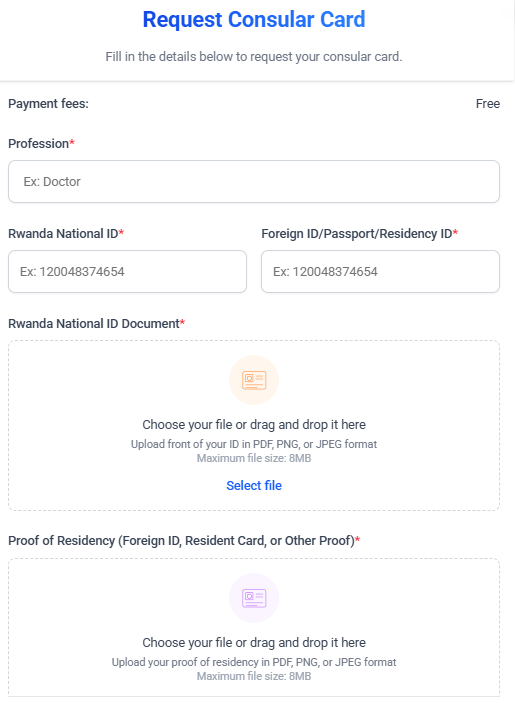
- Your profession
- Rwanda National ID number and document (PDF, PNG or JPEG, max 8MB)
- Foreign ID / Passport / Residency ID and proof of residency
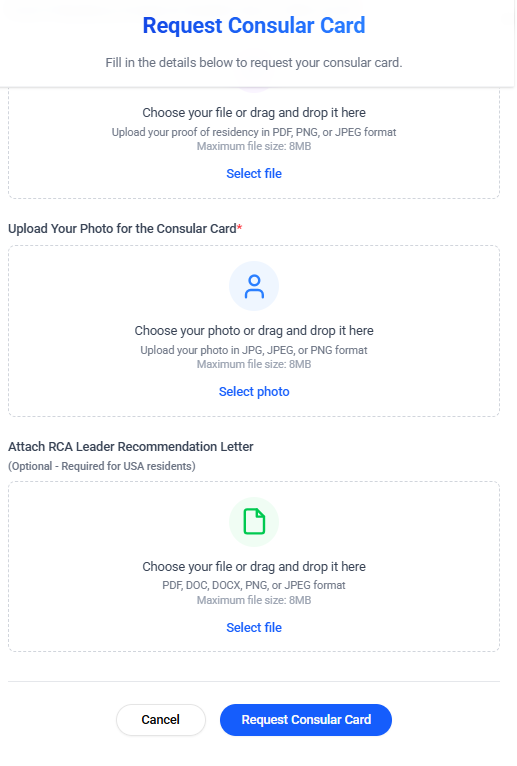
- A photo for the consular card (JPG, JPEG or PNG, max 8MB)
The service is free of charge.
Open the RCA portal consular high-commission documents
Step-by-step guide (from the RCA newsletter)
- 1
Go to rwandancommunityabroad.gov.rw and click “Create account”.

- 2
Fill in your personal information to create your account.

- 3
Check your email and activate your account.

- 4
Your email is verified — the embassy reviews and approves your account.

- 5
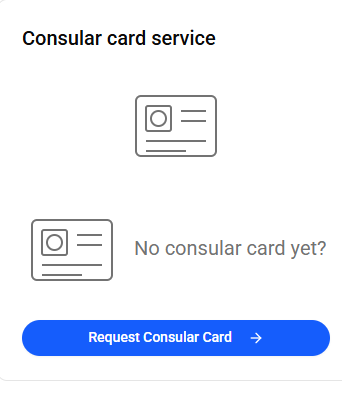
Once approved, sign in and open the Consular card service, then click “Request Consular Card”.
- 6
Fill in the request form: profession, Rwandan National ID, and upload your ID document and proof of residency.
- 7
Upload your photo for the card, attach the RCA leader recommendation letter if needed, and submit your request.